Using PHP, SASS and Tailwind to make website development faster, more consistent and easier to maintain.
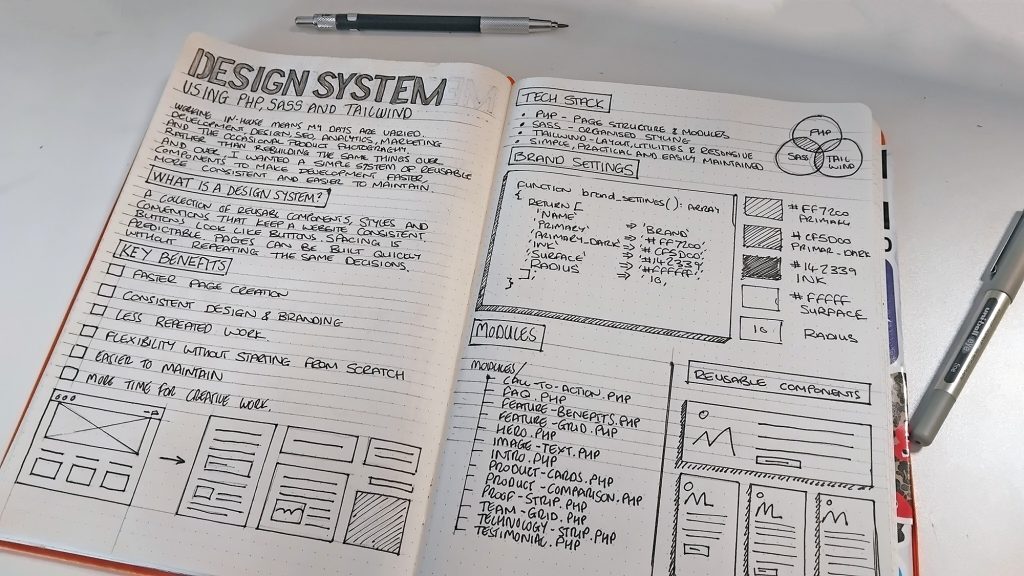
Working in-house as a web developer and digital designer means my days can be quite varied. I might spend the morning developing a new page, the afternoon looking at analytics or SEO, and somewhere in between find myself working on branding, UX or a marketing campaign. Occasionally, I’ll even get the camera out to photograph products or create imagery for the website.
It’s one of the things I enjoy about working in-house. There’s always something different to get involved with, and I get to use a mixture of creative and technical skills rather than concentrating on just one discipline.
Recently, I’ve been working on a website rebuild and decided to approach things a little differently. Rather than developing individual pages and repeatedly writing similar code, I’ve been putting together my own lightweight design system.
It’s built around PHP modules, SASS and Tailwind CSS, with an emphasis on reusable components, consistency and making future development easier.
Nothing particularly groundbreaking in terms of technology, but that’s not really the point.
What is a design system, and why bother?
A design system is essentially a collection of reusable components, styles and conventions that help keep a website consistent.
At one end, that might simply mean having an agreed set of colours, typography and spacing rules. At the other, it could involve extensive component libraries, documentation and development frameworks.
For me, the appeal is somewhere in the middle.
I wanted a way to create pages quickly without having to make the same design decisions repeatedly. Buttons should look like buttons, spacing should be predictable, and elements such as testimonials, feature grids and calls to action shouldn’t need rebuilding every time they’re used.
There’s also a longer-term benefit. Websites are rarely finished. Content changes, products evolve, designs get refined and new requirements appear.
Having a system in place makes those changes easier to manage.
Building something practical
I didn’t want to introduce a complicated framework or create a dependency on something that might become difficult to maintain.
Instead, I’ve been using technologies I’m already comfortable working with.
PHP handles the page structure and reusable modules. SASS helps organise the styling, while Tailwind provides utility classes for quickly creating layouts and handling common spacing and responsive requirements.
I’ve also been applying principles associated with object-oriented development, particularly separating responsibilities and keeping related functionality together. The module examples themselves use procedural PHP, rather than classes, but follow the same broader aim of making code easier to reuse and maintain.
The result is a growing collection of components that I can use across different pages.
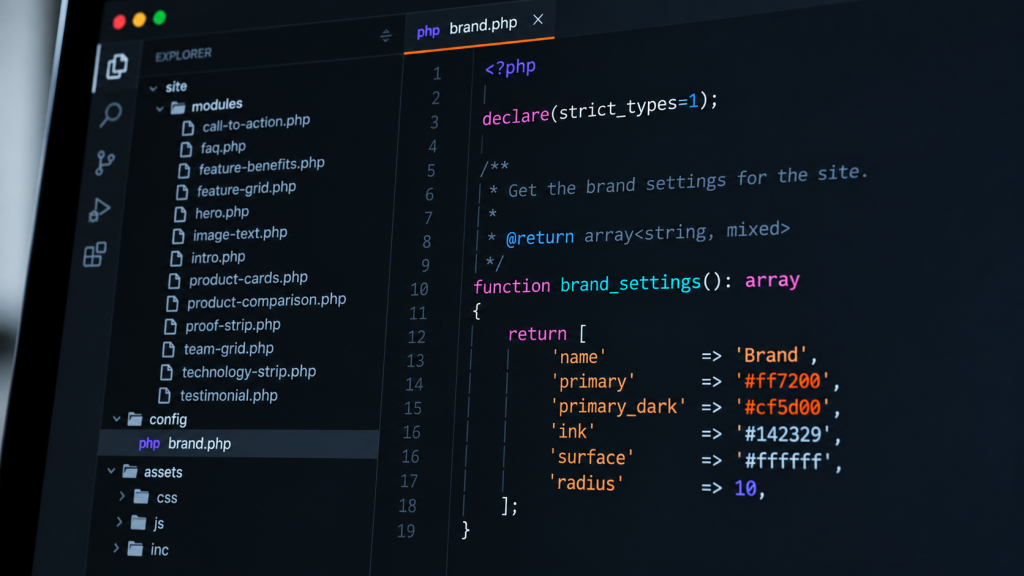
Here’s a small selection from the current module directory:
modules/
├── call-to-action.php
├── faq.php
├── feature-benefits.php
├── feature-grid.php
├── hero.php
├── image-text.php
├── intro.php
├── product-cards.php
├── product-comparison.php
├── proof-strip.php
├── team-grid.php
├── technology-strip.php
└── testimonial.php
Each module has a particular responsibility. Some are fairly simple, while others handle more complicated layouts and content.
The important thing is that I can reuse them without copying large sections of HTML between pages.
I simply include the module in the HTML and pass it some information to use.
An example: reusable testimonials
A testimonial section is a good example because it’s something that might appear on several pages, but with different content.
Previously, I might have written the HTML directly into each page. That works, but it creates more work when something needs changing.
With the new approach, I define the content in an array and pass it to a PHP module.
Here’s a simplified example using fictional testimonials:
<?php
$testimonials = [
    [
        'quote' => 'Really pleased with the service.',
        'name' => 'Alex',
        'detail' => 'Customer',
    ],
    [
        'quote' => 'Helpful support and a great experience.',
        'name' => 'Sam',
        'detail' => 'Customer',
    ],
];

include __DIR__ . '/modules/testimonial.php';
?>
The module handles the presentation, while the page controls which testimonials appear.
If I decide to change the appearance of testimonial cards, adjust their spacing or improve the responsive layout, I can make those changes in one place.
It’s a relatively simple approach, but when you’re working across a growing website, those small efficiencies start to matter.
Keeping the visual identity consistent
Another part of the system involves centralising the brand settings.
Rather than scattering colours and other design values throughout different stylesheets, I’ve created a PHP helper that defines a set of defaults and can read overrides from a JSON configuration file.
Here’s a simplified example:
function brand_settings(): array
{
    return [
        'name' => 'Brand',
        'primary' => '#ff7200',
        'primary_dark' => '#cf5d00',
        'ink' => '#142329',
        'surface' => '#ffffff',
        'radius' => 10,
    ];
}
The full helper also validates values loaded from the configuration file, including checking that colours are valid hexadecimal values and that border-radius settings fall within an expected range.
Those settings can then be turned into CSS custom properties:
:root {
    --brand-primary: #ff7200;
    --brand-primary-dark: #cf5d00;
    --brand-ink: #142329;
    --brand-surface: #ffffff;
    --brand-radius: 10px;
}
This provides a common reference for the components.
SASS gives me a way to organise component-specific styles, variables and more complicated styling rules. Tailwind sits alongside it, handling much of the routine layout work.
I’m still refining where one approach ends and the other begins. There’s little point having three different ways to control the same thing, so keeping that relationship understandable is important.
Speed matters, but consistency matters more
The obvious benefit of reusable components is speed.
If I need to create a new page, I already have a collection of elements to work with. Instead of starting from scratch, I can concentrate on choosing the right components and arranging the content.
But consistency is probably the bigger advantage.
When you’re building pages individually, small differences can gradually appear. Spacing changes slightly, headings behave differently, buttons develop variations and layouts become less predictable.
These aren’t necessarily major problems individually, but collectively they make a website harder to maintain.
A design system helps reduce that drift.
It also encourages me to think about design decisions at a component level rather than treating every page as an isolated piece of work.
That doesn’t mean every page has to look the same. The components provide a consistent foundation, but there’s still plenty of flexibility in how they’re combined.
The in-house advantage
I think this approach is particularly useful when working in-house.
Unlike working exclusively on development projects, my responsibilities cover quite a few different areas. Development is only one part of the job, alongside design, content, SEO, marketing and improving the overall user experience.
Sometimes I have a full day to concentrate on development. Other times, I might only have an hour or two between other responsibilities.
Having an established collection of components makes it much easier to pick things up again without having to revisit decisions I’ve already made.
It also makes experimenting with page layouts less time-consuming. I can concentrate on how information is structured, what needs communicating and how someone might interact with a page, rather than spending that time recreating familiar elements.
That’s where I see the greatest value.
The system isn’t simply about producing pages more quickly. It’s about reducing repetitive work so I can spend more time thinking about the problems that actually need solving.
Knowing when not to complicate things
There’s a temptation with projects like this to keep adding functionality.
Every repeated element becomes a component. Every component gets configuration options. Before long, something intended to simplify development becomes another complicated system to maintain.
I’ve been trying to avoid that.
Not everything needs to be abstracted, and sometimes a straightforward piece of HTML is perfectly adequate.
My general approach has been to create modules when there’s a genuine reason for them, rather than trying to anticipate every possible future requirement.
The same applies to the technologies involved. I could probably achieve similar results using a larger framework, but I don’t necessarily need one for this particular project.
I’d rather have something relatively simple that I understand and can maintain.
A system that grows with the website
The design system is still evolving, and I expect it will continue to change as I develop more pages and encounter new requirements.
There are components that could be improved, opportunities to reduce duplicated code and areas where better documentation would help.
But I’m already finding the approach useful.
After more than twenty years working across design and development, I’ve become increasingly interested in the processes behind the work, not just the finished result.
Good design isn’t always about creating something new. Sometimes it’s about recognising patterns, removing unnecessary decisions and making things easier for the next time.
For me, that’s what this project is really about.
Less time rebuilding things I’ve already built, and more time concentrating on the work that needs creative thought.
Leave a Reply